
Updating Client Devices Using Dell OpenManage and Lenovo Vantage
Overview
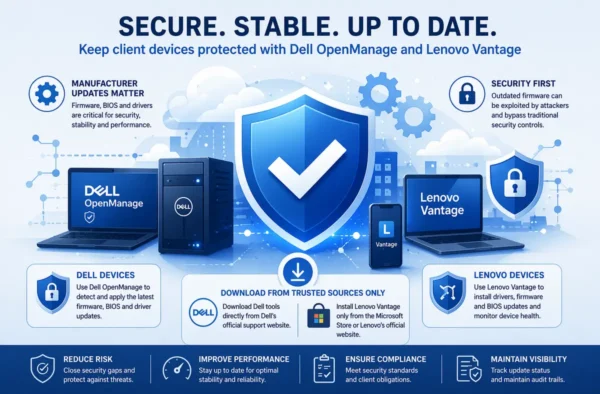
Maintaining up-to-date client devices is a critical component of modern IT security and operational stability. While Windows Updates are covered separately, this article focuses on manufacturer-specific updates, including firmware, BIOS, and hardware drivers, using Dell OpenManage and Lenovo Vantage.
These tools are essential in ensuring that endpoint devices remain secure, stable, and fully supported. As part of our managed service standards, all supported devices must be regularly checked and updated using the appropriate vendor tooling.
Why Manufacturer Updates Matter (Security Perspective)
Operating system patching alone is not sufficient to secure a device. A significant portion of security risk exists below the OS layer, within firmware and hardware components.
Firmware is embedded software that controls how hardware operates and interacts with the operating system. Because it operates at such a low level, it represents a high-value target for attackers. If compromised, firmware can bypass traditional protections such as antivirus or endpoint detection.
Outdated firmware and drivers expose systems to:
- Privilege escalation vulnerabilities
- Remote code execution risks
- Persistence mechanisms that survive OS rebuilds
- Data exfiltration and integrity compromise
For example, known firmware vulnerabilities have allowed attackers to execute code at the pre-boot level and gain administrative control of systems.
Similarly, vulnerabilities in OEM tools such as Lenovo Vantage have demonstrated that unpatched components can allow attackers to gain SYSTEM-level access, representing full control of the endpoint.
From a compliance standpoint (ISO 27001, Cyber Essentials), maintaining current patch levels—including firmware—is part of basic vulnerability management and preventive maintenance, helping to avoid breaches and operational disruption.
Key takeaway:
If Windows is patched but firmware is not, the device is still vulnerable.
Approved Update Tools
Dell Devices – Dell OpenManage
Dell OpenManage (including OpenManage Enterprise / Dell Command tools for endpoints) is the approved mechanism for managing firmware, BIOS, and driver updates on Dell systems.
It provides:
- Centralised visibility of hardware versions
- Identification of required firmware updates
- Deployment of vendor-tested updates
- Security features such as encryption, RBAC, and secure communication channels within the platform
Dell regularly releases updates to address security vulnerabilities, performance issues, and compatibility problems, and these should be applied as part of routine maintenance.
Lenovo Devices – Lenovo Vantage
Lenovo Vantage is Lenovo’s official update and device management tool for Windows-based Lenovo hardware.
It enables:
- Detection and installation of drivers, firmware, and BIOS updates
- Device health monitoring and diagnostics
- Security configuration and optimisation
- Access to model-specific updates tailored to the device
It consolidates update management into a single interface, removing the need for manual driver searches and ensuring compatibility with the specific hardware platform.
Security Requirement: Approved Sources Only
It is essential that all update tools are obtained from trusted, official sources only.
- Dell systems:
Download OpenManage or Dell Command tools directly from Dell’s official support website. - Lenovo systems:
Install Lenovo Vantage only via the Microsoft Store or Lenovo’s official site.
This requirement exists to mitigate supply chain risks. Downloading from third-party sites introduces the possibility of:
- Tampered executables
- Malicious installers
- Outdated or unsupported versions
Using official distribution channels ensures that all software is:
- Cryptographically signed
- Verified by the manufacturer
- Receiving legitimate updates
Do not install vendor tools from third-party download sites under any circumstances.
Operational Guidance
1. Device Identification
- Confirm manufacturer (Dell or Lenovo)
- Confirm model and asset tag
- Ensure device is within supported lifecycle
2. Tool Installation / Validation
- Verify that:
- Dell OpenManage (or equivalent) is installed on Dell devices
- Lenovo Vantage is installed on Lenovo devices
- If missing:
- Install from approved source only (see above)
3. Update Assessment
- Run a full system scan within the vendor tool
- Identify:
- Critical updates (security / BIOS / firmware)
- Recommended updates (drivers, stability improvements)
4. Update Deployment
- Apply updates in the following order where applicable:
- BIOS / firmware
- Chipset and critical drivers
- Remaining drivers and enhancements
- Ensure:
- Device is connected to power (especially laptops)
- User disruption is minimised (schedule appropriately)
5. Reboot and Validation
- Restart the device where required
- Re-run the scan to confirm:
- No outstanding critical updates remain
- Record update status in ticket / management system
Best Practice Considerations
- Regular cadence:
Incorporate manufacturer updates into routine maintenance cycles (monthly or aligned with patching cycles) - Prioritise critical updates:
Firmware and BIOS updates linked to security advisories should be treated with urgency - Test where possible:
For larger client estates, validate updates on pilot devices before full rollout - Audit trail:
Maintain records of update status for compliance and reporting (particularly for ISO 27001 / Cyber Essentials) - Avoid unmanaged tools:
Do not use generic driver update utilities or third-party patching tools for firmware
Risks of Non-Compliance
Failure to maintain manufacturer updates can result in:
- Exposure to known, actively exploited vulnerabilities
- Increased risk of ransomware or targeted attacks
- Device instability and performance degradation
- Ineligibility for insurance claims (where patching is mandated)
- Non-compliance with security frameworks and client obligations
Attackers increasingly target firmware because it is less visible and often poorly maintained, making it an attractive entry point into enterprise environments.
Summary
Keeping client machines updated is not limited to Windows patching. Manufacturer updates—delivered through Dell OpenManage and Lenovo Vantage—play a critical role in securing endpoints at the hardware level.
By:
- Using official vendor tools
- Downloading only from trusted sources
- Applying updates regularly
- Maintaining an audit trail
you ensure that devices remain secure, stable, and compliant with modern security standards.